Tickets | NC State LIVE 2026/27
Subscribe & Save
Save up to 25% when you Create Your Own Series package.
Subscriptions go on sale August 12, 2026.
Single Tickets
Wolfpack Welcome Weeks event tickets go on sale August 17, 2026.
Single tickets for our Mainstage Season open September 3, 2026.
Wolfpack Discounts
Student tickets $10
Faculty/Staff tickets $25
See more discount offers below.
Choose where and when to buy:
This year, you have several options for purchasing tickets:
- Subscriptions will be available online beginning on August 12, 2026 at 10 a.m.
- Ticket Central will be open for special box office hours for you to stop by or call:
Box Office Hours:
- Monday, August 10 – Friday, August 14: Open from 1:30 – 5:30 p.m.
- Thursday, August 20: Regular hours begin (Thursday and Friday afternoons 1:30 – 5:30 p.m.).
- Before heading out, check Ticket Central box office hours here.
Box Office Address: 2241 Dunn Avenue in Thompson Hall
Phone: 919.515.1100
Email: [email protected]
Discounts
NC State LIVE offers several discounts for single tickets:
- NC State Student tickets $10
- NC State Faculty/Staff tickets $25
- 15% off for senior citizens
- 15% off for active or retired military. Use online coupon code: NCSLMIL
- Triangle-area college and high/secondary school students also receive $10 tickets (with student ID)
- For group discounts and other ticketing questions, please email Ticket Central at [email protected]
Return Policy
If a performance is canceled or if you get sick, your tickets will be fully refunded.
Create Your Own Series
Cultivate joy all year long with a Create Your Own Series subscription! Subscriptions will be on sale for a limited time from August 12 through September 30, 2026. Subscriptions allow you to save up to 25% on full-priced tickets and enjoy additional perks – everything from fee-free ticket exchanges to discounted special events. Learn more about our Create Your Own Series subscription program.
NC State Goes Cashless
As of August 1, 2022, Ticket Central will no longer accept cash. In response to feedback over the past several years, the University invested in its technology infrastructure to increase the flexibility to accept electronic payments. Credit and debit cards are accepted.
STUDENTS! Need help claiming your free ticket?
View step-by-step instructions with screen shots.
NOTE: Tickets MUST be claimed online.
CELL PHONE Instructions to claim one free student ticket
- When you click the link to purchase tickets you will arrive at a page that looks like this.
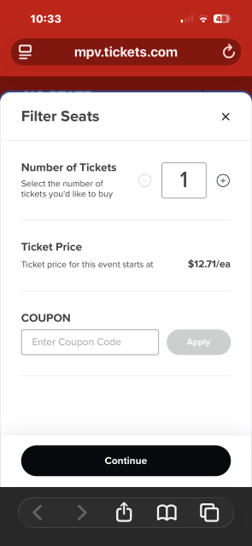
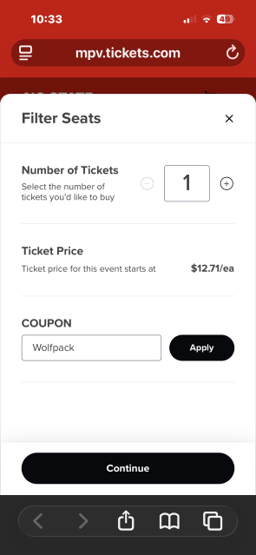
- Enter Code WOLFPACK in Coupon Box. Click ‘APPLY’.
- A message will appear saying coupon has been validated. Click ‘CONTINUE’.
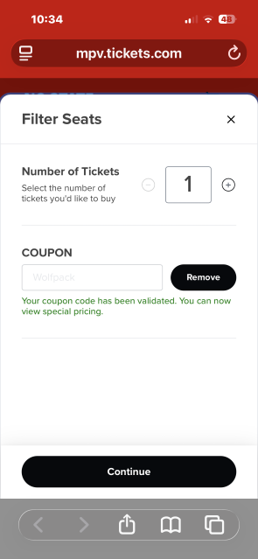
- Click up arrow bottom right next to ‘General Admission Selected’.
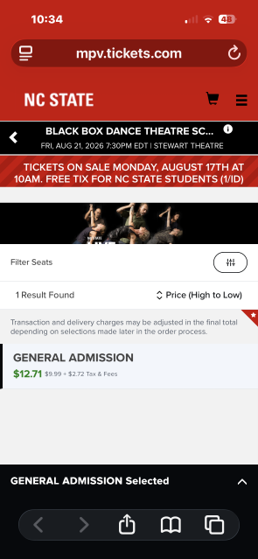
- System will default to 1 NC State Student Comp. Click ‘Buy 1 Seat’.
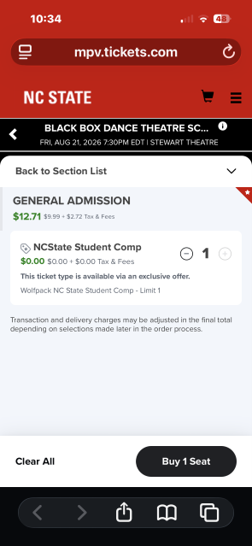
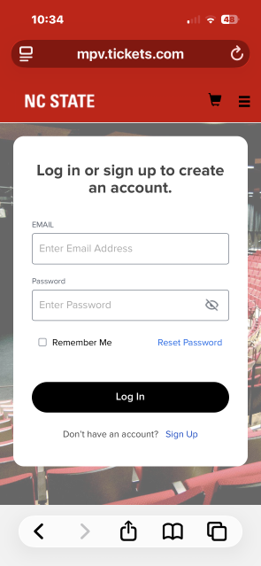
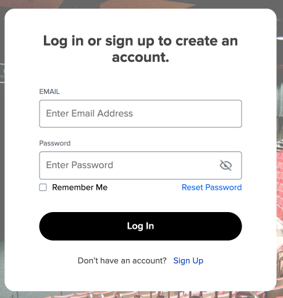
- You will arrive at the login screen.
If you’ve used Ticket Central online before, login to your account.
If you’ve forgotten your password, LEAVE ALL FIELDS BLANK and click blue “Reset Password”. On the next screen, enter your email address and click SUBMIT. Check your email and use link to reset password.
If you’ve never reserved tickets online, LEAVE ALL FIELDS BLANK and click “Sign Up”. Be sure to use your ncsu.edu email.
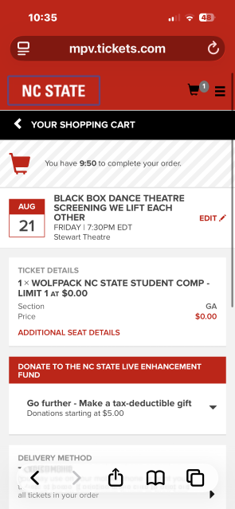
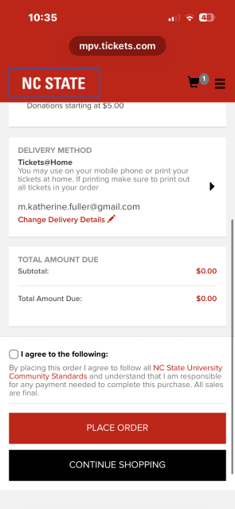
- Scroll down to bottom of shopping cart. Check “I Agree” statement and Place Order. Check Email for order confirmation and ticket.
DESKTOP COMPUTER Instructions to claim one free student ticket
- When you click the link to purchase tickets you will arrive at a page that looks like this.
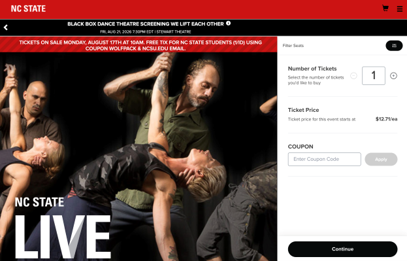
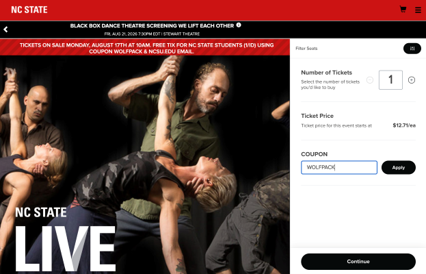
- Enter Code WOLFPACK in Coupon Box. Click ‘APPLY’.
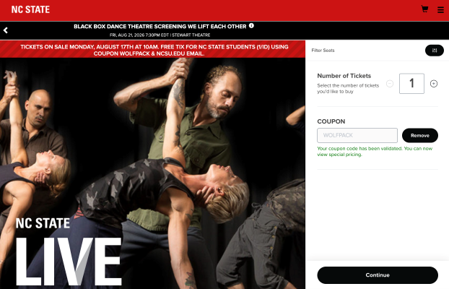
- A message will appear saying the coupon has been validated. Click ‘CONTINUE’.
- System will default to 1 NC State Student Comp. Click ‘Buy 1 Seat’.
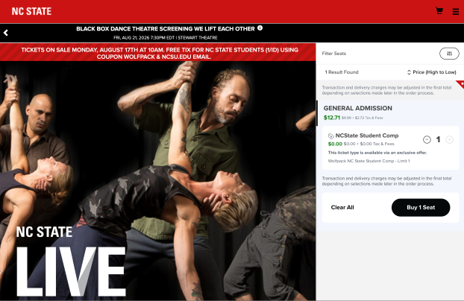
- You will arrive at the login screen.
If you’ve used Ticket Central online before, login to your account.
If you’ve forgotten your password, LEAVE ALL FIELDS BLANK and click blue “Reset Password”. On the next screen, enter your email address and click SUBMIT. Check your email and use link to reset password.
If you’ve never reserved tickets online, LEAVE ALL FIELDS BLANK and click “Sign Up”. Be sure to use your ncsu.edu email.
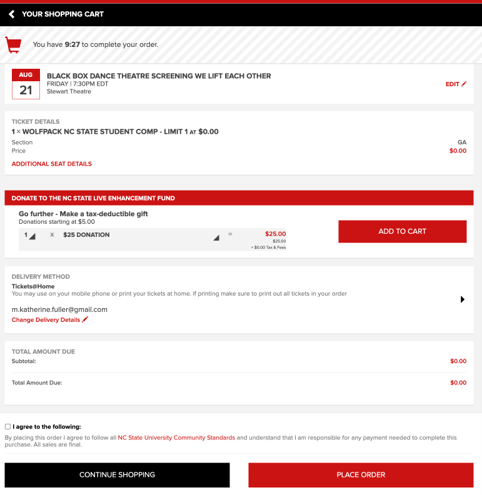
- You are now in your shopping cart and may complete the transaction.